Monitor
Hashrate, power, temperatures, fans and shares for every rig and every card, with history charts.
MineFleet watches your GPU and CPU machines in real time, applies your overclock settings, switches coin in one click, and e-mails you the moment a rig has a problem. An agent installs with one command on Ubuntu or HiveOS.
Live on MineFleet
Live figures: the machines currently connected to MineFleet.
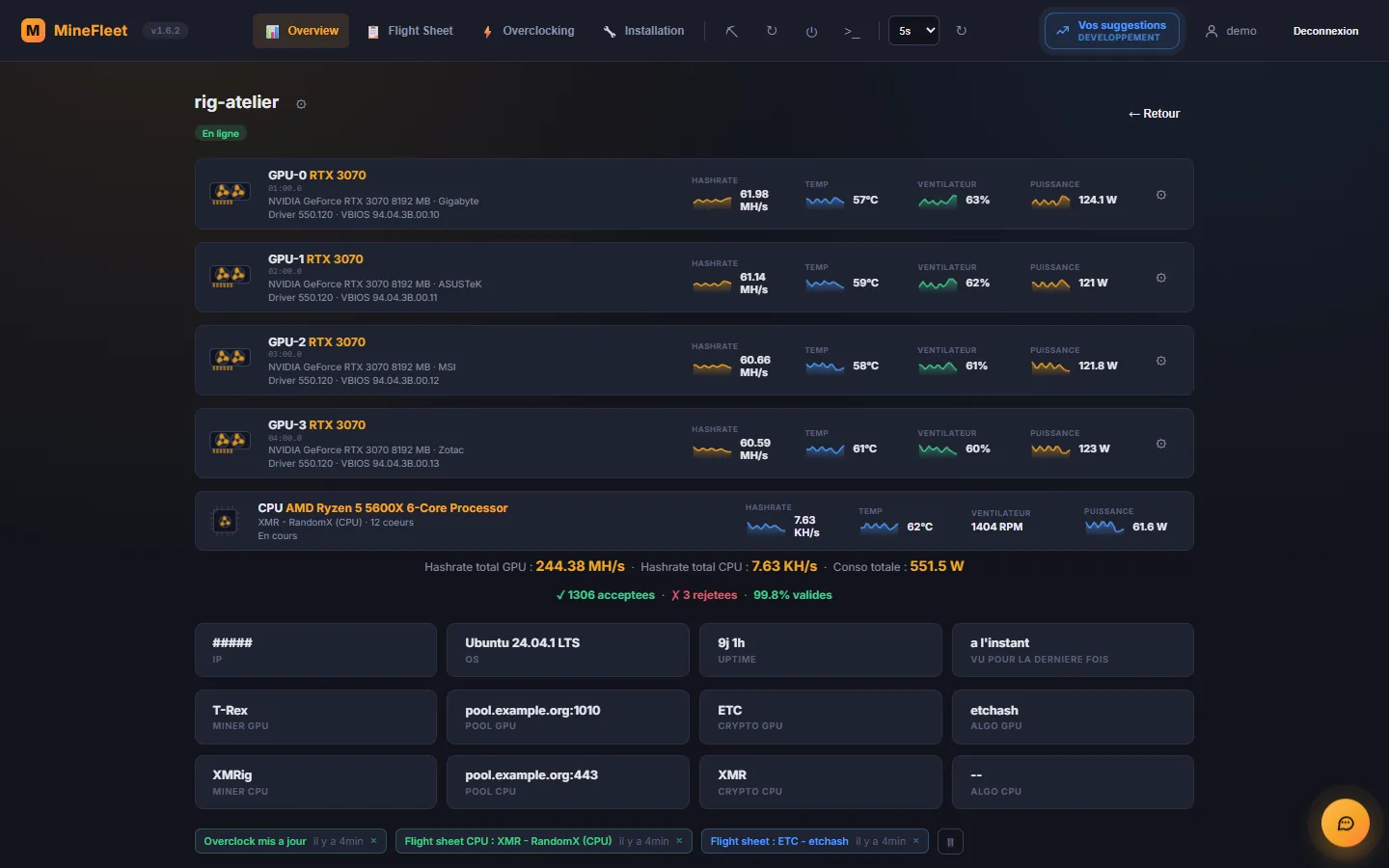
MineFleet is an online mining rig manager. It is a web dashboard that brings together all your cryptocurrency mining machines (graphics cards and processors): you see their status live and control them remotely, without logging into each one.
Hashrate, power, temperatures, fans and shares for every rig and every card, with history charts.
Start, stop or restart mining, switch flight sheet, set the overclock, reboot the machine or open a console.
The agent installs drivers and miners, updates itself, restarts a stalled miner and e-mails you.
Everything you need to manage anything from a single rig to a whole farm, from a browser.
Hashrate, power, temperatures, fans and shares for every rig and every card, with history charts.
Learn more →Set coin, wallet, pool and miner once, give each flight sheet the cards you choose on the same rig, or spread them across a 24-hour bar with an overclock per slot.
Learn more →Power limit, clock lock or offset, fans, and reusable named profiles.
Learn more →One flight sheet for the cards, another for the processor, with the CPU temperature and fan.
Learn more →A terminal on the rig, right in your browser, protected by a 6-digit code sent by e-mail.
Learn more →Rig offline, card crashing, stalled miner: you are notified, then told when things are back to normal.
Learn more →A temperature limit for the cards and the processor: mining pauses, stops or restarts, even without internet. A faulty card is isolated: the others keep mining.
Learn more →The agent restarts a stalled miner, protects a faulty card and keeps mining even without a connection.
Learn more →NVIDIA driver, miners, updates: the agent takes care of everything, on Ubuntu or HiveOS.
Learn more →A few minutes is enough to see a first rig appear in the dashboard.
Enter your e-mail, type in the code you received and pick a username. There is no password to remember.
Create a farm, add a rig, copy the install command and paste it as root on the machine. Progress shows up live in MineFleet.
Pick a flight sheet (coin, pool, wallet, miner) and assign it to the rig. The miner is downloaded and started automatically.
MineFleet adapts to what you already have: no system image to flash.
Keep your Ubuntu or your HiveOS rig: the agent adds on top, in one command.
If your connection or MineFleet is down, your rigs keep mining with their last configuration.
MineFleet only ever asks for your wallet's public address. Never a private key or a recovery phrase.
Mine with your cards and your processor at the same time, with hashrates shown separately.
The agent updates itself and reinstalls whatever is missing: NVIDIA driver, miners.
Suggest ideas and follow their progress directly in the application.
Practical answers, with the steps exactly as they are in MineFleet.
Coin, miner, pool and wallet brought together on a single sheet, assignable to all your rigs.
ComparisonWho mines what, under which algorithm name, and with which pools.
GuideAn NVIDIA card inside a Windows PC, no dual boot needed (direct installation on Windows itself is paused).
GuideA temperature limit and an automatic action, even without internet.
MineFleet is a web dashboard, built in France, for monitoring and remotely controlling cryptocurrency mining rigs. A small agent installed on each machine reports the hashrate, power, temperatures and mining status; you then manage everything from your browser: flight sheets, overclock, reboot, remote console.
Yes: creating an account and using MineFleet are free of charge today, no card required. MineFleet never adds a fee on top of your mining: your hashrate goes straight to your pool and your wallet. Third-party miners (T-Rex, SRBMiner, XMRig…) may have their own fees, shown on the supported miners page.
No. There is no system image to flash: a single command installs the agent on an existing Ubuntu, or on a HiveOS rig. The steps are detailed on the installation page.
NVIDIA cards get every feature: hashrate, power, temperatures and fans per card, and overclocking. AMD cards can mine with the compatible miners, with hashrate and shares reported. Processors (CPU) are monitored too: hashrate, power, temperature and fan speed when the motherboard exposes them. Details are on the compatibility table.
The Linux agent runs on Ubuntu 22.04 and 24.04, as well as on HiveOS rigs. Direct installation on Windows is paused: it will return soon. In the meantime, a Windows PC with an NVIDIA card can be managed through WSL2 (Ubuntu inside Windows): see the mining on Windows with WSL2 guide.
Yes: the MineFleet interface is available in French, English, German, Spanish, Russian and Simplified Chinese. Everyone picks their language on the sign-in screen or in "My account"; the choice follows the account, and alert e-mails are written in the same language. The public pages and the site's guides are, for now, in French.
Create your free account and add your first rig in a few minutes.